
본문 바로가기
여행

파주 감악산 출렁다리 코스 및 주차 정보 총정리,감악산 기본 정보 및 주차 팁,감악산 하이라이트: 출렁다리와 운계폭포,추천 등산 코스 (난이도별)

by xocnf 2026. 5. 2.
반응형

파주 감악산


[국내 여행] 파주 감악산 출렁다리 코스 및 주차 정보 총정리

경기도 파주에 위치한 감악산은 '바위 사이로 검은빛과 푸른빛이 동시에 난다' 하여 이름 붙여진 곳입니다. 서울 근교에서 가볍게 산행을 즐기기 좋고, 특히 명물인 출렁다리 덕분에 사계절 내내 관광객들의 발길이 끊이지 않는 곳이죠. 오늘은 감악산 여행을 계획하시는 분들을 위해 코스, 주차, 꿀팁을 정리해 드립니다.
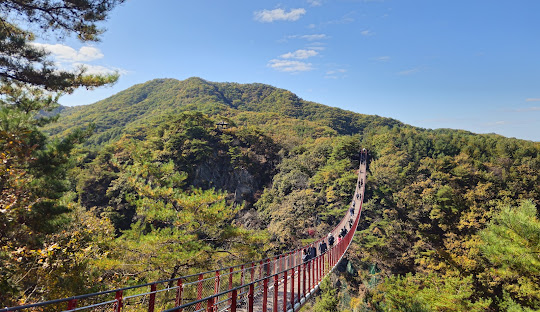

감악산 출렁다리

1. 감악산 기본 정보 및 주차 팁

본격적인 산행 전, 가장 먼저 확인해야 할 것은 주차입니다. 감악산은 방문객이 많아 주차장 선택이 중요합니다.

  • 위치: 경기도 파주시 적성면 설마천로 238
  • 주차 요금: 승용차 기준 하루 2,000원 (대형 4,000원)
  • 주차 팁: * 제1주차장: 출렁다리와 가장 가깝지만 주말에는 금방 만차됩니다.
    • 제2, 3주차장: 조금 걷더라도 여유로운 주차를 원하신다면 추천드립니다.
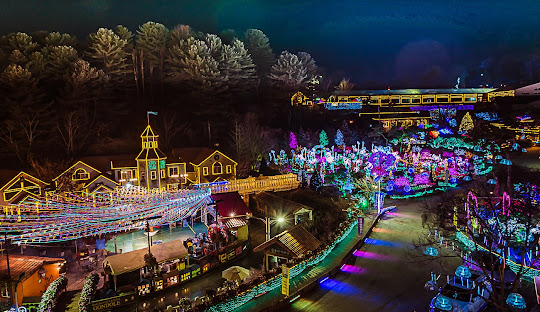
야간조명

2. 감악산 하이라이트: 출렁다리와 운계폭포

감악산 여행의 핵심은 단연 출렁다리입니다. 산의 능선을 잇는 이 다리는 아찔한 높이에서 감악산의 전경을 한눈에 담을 수 있게 해줍니다.

🔴 출렁다리 (Gloucester Heroes Bridge)

길이 150m의 무주탑 산악 현수교로, 걸을 때마다 느껴지는 미세한 흔들림이 스릴을 선사합니다. 고소공포증이 없다면 다리 중간에서 사진을 남기는 것은 필수 코스입니다.

🌊 운계폭포와 야간 경관조명

출렁다리를 건너 조금만 걸어가면 운계폭포를 만날 수 있습니다. 특히 최근에는 야간 개장을 통해 화려한 조명 쇼인 '신비의 숲' 테마를 운영하고 있어 밤에도 색다른 매력을 느낄 수 있습니다.
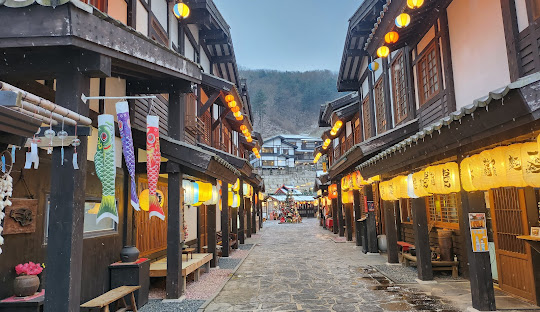
야간조명


3. 추천 등산 코스 (난이도별)

감악산은 초보자부터 숙련자까지 즐길 수 있는 다양한 코스가 있습니다.

코스 구분 주요 경로 소요 시간
초보 코스 제1주차장 → 출렁다리 → 운계사 (산책 위주) 약 40분
중급 코스 출렁다리 → 운계사 → 범륜사 → 정상 약 2시간 30분
완주 코스 범륜사 → 까치봉 → 정상 → 장군봉 → 임꺽정봉 약 4시간

Tip: 무리한 산행보다는 자신의 체력에 맞춰 범륜사 정도까지만 다녀와도 충분히 훌륭한 경치를 감상할 수 있습니다.


4. 여행 전 꼭 확인하세요!

  1. 신발: 출렁다리까지는 데크길이 잘 되어 있지만, 정상으로 갈수록 바위가 많으므로 접지력이 좋은 등산화를 권장합니다.
  2. 편의시설: 범륜사 인근에 화장실과 매점이 있으나, 정상 근처에는 없으니 미리 준비하세요.
  3. 반려동물: 목줄 착용 시 동반 입산이 가능하여 강아지와 함께 여행하기에도 좋습니다.

맺음말

파주 감악산은 수려한 자연경관과 스릴 넘치는 출렁다리를 동시에 즐길 수 있는 최고의 수도권 여행지입니다. 이번 주말, 답답한 도심을 벗어나 맑은 공기를 마시며 감악산의 기운을 느껴보시는 건 어떨까요?

도움이 되셨다면 공감과 댓글 부탁드립니다!

반응형

._my-button { /* 위 아래 거리 */ margin-top: 30px !important; margin-bottom: 30px !important; /* 글자 크기 */ font-size: 25px !important; /* 글자 굵게 (사용한 폰트에 따라 적용이 될 수도 안될 수도 있음) */ /* 100 ~ 900 (일반적으로 500) */ font-weight: 700 !important; /* 가로 크기 */ /* 글자 크기만큼 줄이려면 fit-content */ width: fit-content !important; /* 버튼 안의 상하 / 좌우 여백 */ padding: 12px 50px !important; /* 글자색 */ color: white !important; /* 배경색 */ background-color: rgb(255, 69, 69) !important; /* background: linear-gradient(to right, rgb(88, 166, 255), rgb(117, 67, 255)); */ /* 테두리 */ border-style: solid !important; /* 모양 */ border-width: 4px !important; /* 두께 */ border-color: rgb(202, 77, 77) !important; /* 색깔 */ /* 글자에 밑줄 넣을지(underline), 말지(none) */ text-decoration: none !important; /* 테두리 둥근 정도 */ border-radius: 100px !important; /* 애니메이션 동작 */ transition-duration: 0.3s !important; /* 버튼 그림자 */ box-shadow: 2px 4px 6px rgba(0, 0, 0, 0.4) !important; /* 텍스트 그림자 */ text-shadow: 2px 4px 6px rgba(0, 0, 0, 0.2) !important; display: flex !important; justify-content: center !important; align-items: center !important; margin-left: auto !important; margin-right: auto !important; cursor: pointer !important; opacity: 1 !important; transition-property: all !important; line-height: 1.5 !important; text-align: center !important; white-space: nowrap !important; overflow: hidden !important; } ._my-button:hover { transform: scale(1.2) !important; background-color: rgb(96, 170, 255) !important; border-color: rgb(74, 143, 223) !important; } ._my-button { /* 위 아래 거리 */ margin-top: 30px !important; margin-bottom: 30px !important; /* 글자 크기 */ font-size: 25px !important; /* 글자 굵게 (사용한 폰트에 따라 적용이 될 수도 안될 수도 있음) */ /* 100 ~ 900 (일반적으로 500) */ font-weight: 700 !important; /* 가로 크기 */ /* 글자 크기만큼 줄이려면 fit-content */ width: fit-content !important; /* 버튼 안의 상하 / 좌우 여백 */ padding: 12px 50px !important; /* 글자색 */ color: white !important; /* 배경색 */ background-color: rgb(255, 69, 69) !important; /* background: linear-gradient(to right, rgb(88, 166, 255), rgb(117, 67, 255)); */ /* 테두리 */ border-style: solid !important; /* 모양 */ border-width: 4px !important; /* 두께 */ border-color: rgb(202, 77, 77) !important; /* 색깔 */ /* 글자에 밑줄 넣을지(underline), 말지(none) */ text-decoration: none !important; /* 테두리 둥근 정도 */ border-radius: 100px !important; /* 애니메이션 동작 */ transition-duration: 0.3s !important; /* 버튼 그림자 */ box-shadow: 2px 4px 6px rgba(0, 0, 0, 0.4) !important; /* 텍스트 그림자 */ text-shadow: 2px 4px 6px rgba(0, 0, 0, 0.2) !important; display: flex !important; justify-content: center !important; align-items: center !important; margin-left: auto !important; margin-right: auto !important; cursor: pointer !important; opacity: 1 !important; transition-property: all !important; line-height: 1.5 !important; text-align: center !important; white-space: nowrap !important; overflow: hidden !important; } ._my-button:hover { transform: scale(1.2) !important; background-color: rgb(96, 170, 255) !important; border-color: rgb(74, 143, 223) !important; }